Best Drawing Tablets for Kids to Buy in 2026
A “drawing tablet for kids” can mean three completely different things:
- a simple LCD doodle board for doodles and handwriting,
- a pen tablet that connects to a computer (no screen), or
- a real tablet / drawing display where kids draw directly on the screen.
The best choice depends on age and goals. Younger kids need something durable and instant. Older kids who are serious about art need pressure sensitivity, good apps, and a display that doesn’t feel laggy.
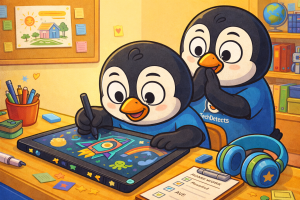
This guide covers the best options that are actually worth buying in 2026, including simple “first drawing” devices and legit creative tools that can grow with a child.
Quick Picks (TL;DR)
- Best for Toddlers & Quick Doodles: Boogie Board Jot – mess-free, instant erase, super simple.
- Best First “Real” Drawing Setup (Computer): XP-Pen Deco Fun (S/L) – affordable, battery‑free pen, great starter control.
- Best Budget Pen Display (Draw on Screen): XP-Pen Artist 12 (2nd Gen) – laminated screen, great starter display tablet.
- Best Beginner-Friendly Premium Display: Wacom One 12 – clean pen feel, strong reliability.
- Best Value Tablet with Stylus (All-in-One): Samsung Galaxy Tab S9 FE (S Pen included) – solid drawing + school tablet.
- Best High-Quality Android Art Tablet: Xiaomi Pad 6 + Xiaomi Smart Pen (2nd Gen) – 144Hz display and strong performance.
- Best for Older Kids/Teens (Art + Everything): iPad (10th Gen) + Apple Pencil (USB‑C) – huge app ecosystem and smooth performance.
Before You Buy: Choose the Right Type
1) LCD doodle boards (no apps)
Best for ages 3–7: doodles, practice writing, no setup.
- Pros: cheap, durable, zero distractions.
- Cons: not “digital art” (no layers, no saving—unless the model supports it).
2) Pen tablets (connect to a computer)
Best for ages 8+: real drawing skills without paying for a screen.
- Pros: excellent value, pressure sensitivity, great for learning.
- Cons: takes a week or two to get used to “draw here, look there.”
3) Pen displays / full tablets (draw on screen)
Best for ages 10+ who are serious about art.
- Pros: most natural drawing feel.
- Cons: higher cost; screen displays still require a computer (unless it’s a standalone tablet).
Boogie Board Jot — Best for Toddlers & Quick Doodles
Why it’s great: This is the simplest “grab and draw” option—perfect for quick doodles, handwriting practice, and calm screen-free fun. Tap to erase and hand it back.
Best for: Ages ~3–7, doodles, tracing letters, quick notes.
Highlights: LCD writing surface · one‑button erase · write with stylus or fingertip · ultra‑light.
XP-Pen Deco Fun (S/L) — Best First Pen Tablet for Kids
Why it’s great: If your child is ready for real digital art but you don’t want to buy a screen tablet yet, this is the sweet spot. The pen is battery‑free and responsive, and the tablet is easy to set up with common drawing apps.
Best for: Ages ~8–13 learning digital art on a computer.
Highlights: battery‑free stylus · tilt support · multiple sizes · great value for beginners.
One by Wacom — Best “Just Works” Learning Tablet
Why it’s great: Wacom’s beginner pen tablet is famous for reliability and a natural pen feel. It’s an excellent pick when you want fewer setup headaches and a device that lasts.
Best for: Kids who are starting art classes or drawing seriously on a computer.
Highlights: natural pen control · strong driver support · very consistent performance.
XP-Pen Artist 12 (2nd Gen) — Best Budget Drawing Tablet With Screen
Why it’s great: This is one of the most popular “first pen display” choices because it feels like a real drawing device without premium pricing. The laminated display improves accuracy (less gap), and the pen is responsive for sketching and line art.
Best for: Kids/teens who want to draw directly on-screen (with a computer).
Highlights: 11.9″ class display · laminated screen · pressure sensitivity · tilt support.
Huion Kamvas 13 (Gen 3) — Best Screen Tablet for Shortcuts & Workflow
Why it’s great: If your child starts using layers, selections, and shortcut-heavy workflows, a Kamvas with good button/shortcut support can feel faster than purely touch-based tablets. This model is also portable for moving between desk setups.
Best for: Growing artists who want a smooth workflow for digital painting and comics.
Highlights: 13.3″ FHD · modern pen tech · portable design · good color coverage.
Wacom One 12 — Best Beginner Premium Drawing Display
Why it’s great: Wacom’s pen feel is still the reference point for many artists. The Wacom One 12 is a strong choice when you want a clean experience, reliable drivers, and solid build quality.
Best for: Kids/teens serious about art who need a dependable drawing display.
Highlights: compact 12″ class display · battery‑free pen · reliable long-term.
Samsung Galaxy Tab S9 FE (S Pen Included) — Best All‑in‑One Drawing Tablet for Kids
Why it’s great: This is a rare pick that works as both a school tablet and a drawing tablet. The included S Pen is excellent for sketching, the screen is smooth enough for art, and it’s also tough enough for everyday kid use.
Best for: Kids who want one device for art + school + entertainment.
Highlights: 10.9″ 90Hz LCD · S Pen included · strong battery · water/dust resistance.
Xiaomi Pad 6 + Xiaomi Smart Pen (2nd Gen) — Best Value Android Art Tablet
Why it’s great: The 144Hz display makes strokes feel snappy, and the performance is strong for drawing apps and creative multitasking. Add the Xiaomi Smart Pen (2nd Gen) and it becomes a very capable art setup.
Best for: Older kids/teens who want a fast Android tablet for art and media.
Highlights: 11″ WQHD+ · 144Hz variable refresh · strong performance · pen support.
iPad (10th Gen) + Apple Pencil (USB‑C) — Best for Teens (Apps + Smoothness)
Why it’s great: iPad has the biggest “creative apps” ecosystem and an easy learning curve. For many teens, it becomes the center for notes, school work, and art. The Apple Pencil (USB‑C) is the more affordable stylus option (note: it’s not the pressure‑sensitive model), but it’s still great for casual drawing and learning.
Best for: Teens who want a smooth all-round tablet and lots of drawing apps.
Highlights: excellent performance · great app ecosystem · strong resale value · easy to use.
Comparison Guide (Simple)
| Type | Best Pick | Best Age Range | What You Need |
|---|---|---|---|
| LCD Doodle Board | Boogie Board Jot | 3–7 | Nothing else |
| Pen Tablet (No Screen) | XP-Pen Deco Fun / One by Wacom | 8–13 | A computer + drawing app |
| Pen Display (Screen) | XP-Pen Artist 12 (2nd Gen) / Wacom One 12 | 10+ | A computer + drawing app |
| Standalone Drawing Tablet | Galaxy Tab S9 FE / Xiaomi Pad 6 / iPad | 10+ | Stylus + drawing app |
Buying Tips Parents Actually Need
- Start simple for young kids. If they’re under ~7, an LCD doodle board is usually the best use of money.
- If the kid is serious, prioritize the pen. Pressure sensitivity + low latency matter more than “big storage.”
- Screen tablets vs computer tablets: Screen tablets feel easier, but pen tablets are the best value for learning fundamentals.
- Add a matte screen protector on standalone tablets if glare bothers them (and it feels more paper‑like).
- Protect the setup: a sleeve, desk mat, and a cheap stand often improve posture and focus.
Here is a list of Best Laptops to Buy for Kids.
Final Thoughts
If your child is just starting out, keep it fun: Boogie Board Jot or a beginner pen tablet like XP‑Pen Deco Fun is perfect. If they’re serious about art and want to draw directly on a screen, XP‑Pen Artist 12 (2nd Gen) is a strong entry point, while Wacom One 12 is the premium “reliable forever” option. For families who want an all‑in‑one device, Galaxy Tab S9 FE and Xiaomi Pad 6 deliver excellent value—and for teens who want the broadest creative ecosystem, an iPad remains a smooth, long-term choice.