Best Tablets for Writing (2026) — Distraction‑Free Typing, Note‑Taking & Real Drafting
Writers don’t need “the fastest tablet.”
They need a device that makes it easy to start, comfortable to keep going, and reliable to finish.
In 2026, the best writing tablets fall into three clear camps:
- iPad / Android tablets → best for flexible workflows (research, outlines, drafts, editing)
- Windows 2‑in‑1 tablets → best when you need full desktop apps (Scrivener, Word, citation tools)
- E‑ink writing tablets → best for deep focus and eye comfort (long sessions, minimal distractions)
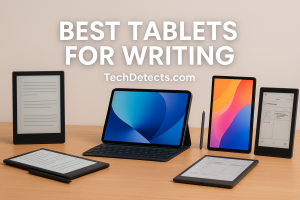
This guide picks the best models for real writing, not spec-sheet flex.
Quick Picks
- Best overall writing tablet: iPad Air (M4, 11-inch or 13-inch)
- Best premium “laptop replacement” for writers: iPad Pro (M4/M5 generation, 11/13)
- Best small tablet for writing on the go: iPad mini (A17 Pro)
- Best Android writing tablet (big screen + DeX): Samsung Galaxy Tab S10 Ultra
- Best Windows tablet for serious writing apps: Microsoft Surface Pro (13-inch) + Flex Keyboard
- Best distraction‑free e‑ink typing: reMarkable 2 + Type Folio
- Best e‑ink for reading + writing + warm light: reMarkable Paper Pro (11.8-inch)
- Best e‑ink with Android apps: BOOX Note Air4 C (Color) / BOOX Go 10.3
- Best for reading + annotating + writing in books: Kindle Scribe (new lineup)
How to Choose a Writing Tablet (The Writer’s Checklist)
Decide how you write: typing, handwriting, or mixed
- Typing-first writers: prioritize keyboard quality, stability, and palm rest.
- Handwriting-first writers: prioritize pen latency, palm rejection, matte screen feel.
- Mixed workflow: you want BOTH a good keyboard and a great pen experience.
Screen size is a productivity decision
- 8–9 inches: great for commuting and quick notes
- 10–11 inches: the sweet spot for most writers
- 12.9–14.6 inches: best for split-screen (research + draft), but less portable
Distraction control matters
If you struggle with notifications and tab-hopping, an e‑ink tablet can be a bigger upgrade than “more power.”
Keyboards are not equal
A “keyboard case” is not automatically a good writing keyboard.
Look for:
- stable hinge
- enough key travel
- a trackpad you don’t hate
- no wobble on lap
The Best Tablets for Writing to Buy (2026)
iPad Air (M4) — Best Overall Writing Tablet
Why it’s here: The iPad Air is the sweet spot: fast, light, great battery, and the app ecosystem for writers is excellent. The newest iPad Air refresh brings modern performance and connectivity upgrades, and it’s available in both 11-inch and 13-inch sizes.
Who it’s for: Most writers — students, bloggers, journalists, authors — anyone who writes a lot and wants one device that can handle outlining, drafting, editing, and research.
What it solves:
- Smooth writing + editing in Google Docs, Word, Pages, Notion, Scrivener-style apps
- Comfortable split-screen on the 13-inch version
- Pen support for margin notes and outlining
Trade-offs: For the absolute best laptop-like keyboard and display, iPad Pro is still the top tier.
iPad Pro (11-inch / 13-inch, M4/M5 generation) — Best Premium Writing Experience
Why it’s here: If you want the cleanest “tablet that feels like a premium laptop when you want it,” iPad Pro is the top iPad. The display quality helps if you write and read for hours, and performance stays effortless even with heavy multitasking.
Who it’s for: Writers who treat their tablet as their main device, or people who do writing + content work (research, editing, light design).
What it solves:
- Best screen for long reading + editing sessions
- Strongest multitasking headroom
- Excellent stylus workflow for annotations
Trade-offs: Expensive — and you’ll pay extra for the keyboard.
iPad mini (A17 Pro) — Best Small Tablet for Writers on the Move
Why it’s here: This is the “always with you” tablet. Perfect for capturing ideas, outlining, reading, and quick drafting without carrying something large.
Who it’s for: Writers who commute, travel, or want a notebook replacement that fits anywhere.
What it solves:
- Ultra-portable writing and note capture
- Great for reading + highlighting + brainstorming
- Pencil support for handwriting notes
Trade-offs: Not ideal for long typing sessions unless you’re okay with a compact keyboard.
Samsung Galaxy Tab S10 Ultra — Best Android Tablet for Writing (Big Screen + DeX)
Why it’s here: If you want Android flexibility with a huge screen for split view, plus stylus support, the Tab Ultra class is the best “writer’s workstation” on Android. DeX mode can feel closer to a laptop workflow.
Who it’s for: Writers who prefer Android, or want a large display for research + drafting side-by-side.
What it solves:
- Big-screen multitasking (research + draft)
- Strong pen notes in Samsung Notes
- DeX productivity for keyboard-heavy writing
Trade-offs: The best experience depends heavily on the keyboard cover and your app choices.
Microsoft Surface Pro (13-inch) + Flex Keyboard — Best Windows Tablet for Serious Writing Apps
Why it’s here: If you need real desktop software — full Word workflows, Scrivener, reference managers, niche publishing tools — Surface Pro is the most straightforward “tablet that is also a real computer.”
Who it’s for: Authors and students who rely on Windows apps or want a true laptop replacement that still works as a tablet.
What it solves:
- Full desktop writing apps (no mobile compromises)
- Proper file handling for big projects
- Best choice if your workflow is already Windows-based
Trade-offs: Typically more expensive once you add the keyboard and pen.
E‑Ink Picks (For Focused, Low‑Distraction Writing)
If your biggest enemy is notifications, eye strain, and doom-scrolling, e‑ink can be the best writing upgrade you’ll ever buy.
reMarkable 2 + Type Folio — Best Distraction‑Free Writing Device (Typing)
Why it’s here: reMarkable’s entire philosophy is focus. With the Type Folio, it becomes an ultra-clean drafting machine: minimal UI, no noisy apps, and a keyboard that doesn’t need charging.
Who it’s for: Writers who want a modern version of a typewriter — pure drafting and thinking.
What it solves:
- Deep focus drafting
- Zero notification temptation
- A calm, paper-like screen for long sessions
Trade-offs: Not for heavy web research. It’s a writing tool, not a general tablet.
reMarkable Paper Pro (11.8-inch) — Best E‑Ink for Reading + Writing + Warm Light
Why it’s here: If you want the calmness of e‑ink but also want a larger, more book-like display with a built-in light, this is the premium e‑ink writing tablet style.
Who it’s for: Writers who read and annotate a lot, then draft from notes.
What it solves:
- Comfortable long reading sessions
- Great handwriting workflow
- Bigger screen reduces “page flipping” fatigue
Trade-offs: Still not a full app tablet — it’s for focus and documents.
BOOX Note Air4 C / BOOX Go 10.3 — Best E‑Ink with Android Apps
Why it’s here: BOOX is the choice if you want e‑ink comfort and access to Android apps. It’s popular with writers who want Kindle/reading apps, note apps, and lightweight writing tools on one calm screen.
Who it’s for: Writers who want e‑ink but still need flexible app access.
👉 Buy BOOX Note Air4 C on Amazon
What it solves:
- E‑ink comfort with app freedom
- Great for reading + note + drafting workflows
- A strong “research + writing” hybrid if you’re disciplined
Trade-offs: More settings and complexity than reMarkable. If you want pure simplicity, reMarkable wins.
Kindle Scribe (New Lineup) — Best for Reading + Annotating + Notes
Why it’s here: If your writing is tied to reading — highlighting books, annotating documents, building notes — Scribe is a very strong “reading-first writing device.”
Who it’s for: Students, researchers, and writers who annotate a lot.
What it solves:
- Comfortable reading + handwritten notes
- Great for marking up documents
- A calm device that keeps you in the book
Trade-offs: Not the best for long-form typing compared to a tablet + keyboard.
Best Picks by Writer Type
You want one device for research + drafting + editing
- iPad Air (M4)
You want the best premium “tablet as main computer” writing setup
- iPad Pro (M4/M5 generation)
You want a compact always-with-you writing notebook
- iPad mini (A17 Pro)
You want big-screen multitasking on Android
- Galaxy Tab S10 Ultra
You need full desktop writing apps (Scrivener/Word workflows)
- Surface Pro (13-inch)
You want a distraction-free drafting machine
- reMarkable 2 + Type Folio
You want e‑ink comfort but with apps
- BOOX Note Air4 C / Go 10.3
Recommended Reading: Best Monitors for Reading — Eye Comfort Picks
What I’d Buy (Real Talk)
- If you’re buying one writing tablet for most people: iPad Air (M4).
- If writing is your job and you want the best premium feel: iPad Pro.
- If you need focus more than features: reMarkable 2 + Type Folio.
Conclusion
The best tablet for writing in 2026 depends on what stops you from writing today:
- If it’s friction and setup → iPad Air + keyboard is the fastest “open and write” workflow.
- If it’s distractions → reMarkable (or BOOX if you want apps).
- If it’s software limitations → Surface Pro gives you a real desktop environment.
If you tell me how you write (typing vs handwriting), where you write (desk vs travel), and your budget, I’ll narrow these to one perfect pick.