Best Scanners for Old Photos (2026)
Old photos are fragile: fingerprints, scratches, curling prints, fading dyes, and the classic “stuck-to-album-page” problem.
So the best scanner isn’t just “high DPI.” It’s the one that matches your photo type (prints vs negatives/slides), your volume (50 photos vs 5,000), and how much you care about restoration.
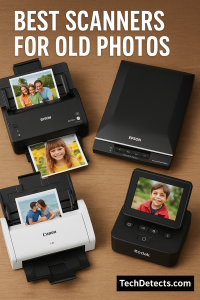
This 2026 guide focuses on scanning old photo prints, albums, and film (negatives/slides) with practical picks that are still worth buying today.
Quick Picks (TL;DR)
- Best for scanning lots of photo prints fast: Epson FastFoto FF‑680W
- Best affordable flatbed for prints + some film: Epson Perfection V600
- Best pro-grade flatbed for serious film scanning: Epson Perfection V850 Pro
- Best “feed-in” scanner for stacks of prints: Plustek ePhoto Z300
- Best budget flatbed for occasional old photos: Epson Perfection V39 II
- Best ultra-slim budget flatbed alternative: Canon CanoScan LiDE 400
- Best dedicated 35mm film scanner: Plustek OpticFilm 8200i SE
- Best “fast + high-quality” film digitizing method (advanced): Valoi easy35 (camera scanning)
How to choose a scanner for old photos
1) Prints vs negatives/slides (this decides everything)
- Prints (4×6, 5×7, albums): flatbed or photo-feeder scanners
- Negatives/slides: a flatbed with film holders, or a dedicated film scanner
If you have both prints and film, a good flatbed with film support is usually the smartest start.
2) DPI that actually makes sense
- Prints: 300–600 dpi is usually plenty; 600 dpi is a great “archive” setting
- Film: higher resolution matters (flatbed film scanning quality varies; dedicated film scanners can extract more)
3) Restoration features that save time
Look for tools like:
- Dust/scratch removal (infrared / ICE) for film and sometimes prints
- Color restoration for faded photos
- Good auto-crop, deskew, and batch naming
4) Volume matters more than you expect
If you have thousands of prints, a flatbed will feel painfully slow. That’s where photo-feeder scanners (FastFoto / ePhoto) become life-saving.
Best Scanners for Old Photos (2026)
Epson FastFoto FF‑680W
Why it’s here: If you have boxes of prints, this is the easiest way to digitize them without turning it into a month-long project. It’s built for speed and photo handling.
Who it’s for: Families scanning hundreds to thousands of prints (4×6, 5×7, panoramas), plus postcards and paper memories.
What it solves:
- Extremely fast print scanning (rated as fast as 1 photo per second at 300 dpi)
- Batch feeding instead of “one photo at a time” flatbed work
- Captures both sides in a single scan (useful for notes on the back)
Trade-offs: Not a film scanner. For negatives/slides you still need a separate solution.
Epson Perfection V600 Photo
Why it’s here: The most balanced “family archiving” flatbed: great for old photo prints, and it also supports film/scanning with solid restoration tools.
Who it’s for: Anyone who has a mix of prints + some negatives/slides and wants one affordable, reliable scanner.
What it solves:
- High-quality print scans
- Film scanning support (slides/negatives)
- DIGITAL ICE for film and prints (great time-saver for cleanup)
Trade-offs: Slower than photo-feeder scanners for big stacks of prints.
Epson Perfection V850 Pro
Why it’s here: If film matters (and you want better control and consistency), this is a big step up. Dual-lens optics and higher Dmax make it a serious “archive” scanner.
Who it’s for: People with lots of negatives/slides (or anyone who cares about extracting maximum detail from film) and also want great print scans.
What it solves:
- Pro-grade film scanning (dual-lens system; high Dmax)
- Better consistency and control for demanding restoration work
- Handles multiple film formats with proper holders
Trade-offs: Expensive and still not “fast” for mass print scanning.
Plustek ePhoto Z300
Why it’s here: A fast, simple “feed-in” scanner that’s made specifically for stacks of photo prints. If your priority is speed and convenience, it’s one of the easiest wins.
Who it’s for: Anyone digitizing large collections of prints who doesn’t want to spend FastFoto money.
What it solves:
- Very fast print scanning workflow (rated about 2 seconds for a 4×6 at 300 dpi)
- Handles common print sizes and letter/A4 docs
- Compact, easy to set up
Trade-offs: Max optical resolution is lower than a high-end flatbed, and it’s not for film.
Epson Perfection V39 II
Why it’s here: If you want a budget-friendly flatbed that still gives you good photo scanning quality for old prints (and some simple restoration), the V39 II is a very clean pick.
Who it’s for: Light home archiving: a few albums, occasional prints, school projects, family sharing.
What it solves:
- Solid print scanning quality (4800 dpi optical rating)
- Simple one-touch workflow
- Easy color restoration for faded prints
Trade-offs: No film holders (prints/documents only).
Canon CanoScan LiDE 400
Why it’s here: A slim, USB‑C flatbed that fits into tiny setups. Great when you want “simple + compact” without dealing with bulky equipment.
Who it’s for: Occasional photo scanning in a small workspace.
What it solves:
- Compact design, powered via USB
- Strong optical resolution rating (4800 x 4800 dpi)
- Good for prints and documents
Trade-offs: Like most slim CIS flatbeds, it’s not the best choice for thick albums or curled photos.
Plustek OpticFilm 8200i SE (35mm film)
Why it’s here: If you have 35mm negatives/slides, a dedicated film scanner can pull out more detail than most flatbeds. The 8200i SE is popular because it adds infrared dust/scratch detection.
Who it’s for: Anyone digitizing 35mm film seriously (family archives, film hobbyists).
What it solves:
- High-resolution 35mm scanning (7200 dpi class)
- Infrared channel for dust/scratch detection (huge time-saver)
- Better film results than typical all-purpose flatbeds
Trade-offs: Only for 35mm and scanning is slower at very high settings.
Valoi easy35 (camera scanning system)
Why it’s here: For advanced users, camera scanning can be the fastest way to get high-quality film results—especially if you already have a good camera + macro lens.
Who it’s for: Film shooters and power users who want speed + consistent results and already own suitable gear.
What it solves:
- Very fast film digitizing workflow compared to traditional scanners
- Consistent illumination and alignment
- Great results once your setup is dialed in
Trade-offs: Requires a camera + macro lens and some setup learning.
“Hidden weapon”: software that keeps old scanners useful
If your scanner is older, manufacturer drivers can break on modern Windows/macOS.
VueScan is well-known for supporting a huge range of scanners and staying updated—often keeping older hardware usable long after official support ends.
Recommended settings for old photos
- Everyday sharing: 300 dpi (JPG)
- Archiving prints: 600 dpi (TIFF or high-quality JPG)
- Small prints you may enlarge later: 600–1200 dpi
- Film: start around 2400–3600 dpi equivalent output and adjust based on your scanner’s real performance
Tip: Always scan one test photo first and check sharpness at 100% before scanning everything.
Comparison Table
| Scanner | Best for | Biggest strength | Main trade-off |
|---|---|---|---|
| Epson FastFoto FF‑680W | Bulk print scanning | Speed + batch feeding | No film |
| Epson V600 | Prints + some film | Best balance for families | Flatbed is slower |
| Epson V850 Pro | Serious film archives | Pro film quality/control | Expensive |
| Plustek ePhoto Z300 | Stacks of prints | Fast feeder workflow | Not for film |
| Epson V39 II | Budget prints | Easy + good quality | No film |
| Canon LiDE 400 | Compact prints | Slim USB‑C flatbed | Not great for thick albums |
| Plustek 8200i SE | 35mm film | Infrared dust removal | 35mm only |
| Valoi easy35 | Advanced film digitizing | Speed + great results | Requires camera gear |
Conclusion
If you’re digitizing thousands of prints, go straight to Epson FastFoto FF‑680W (or Plustek ePhoto Z300 if you want a cheaper feed-in approach).
If you want the best “do most things well” scanner for family archiving, Epson Perfection V600 is the most practical starting point.
And if your real treasure is negatives and slides, either step up to Epson V850 Pro (multi-format film + prints) or grab a dedicated 35mm unit like the Plustek OpticFilm 8200i SE for the best film-focused results.
Check it out in case you need to buy Best Instant Photo Printers to Capture & Print Memories Anywhere.